

Overview
Pre-built tooling
✅ Authorization
✅ Authorization
✅ Read & write data
✅ Read & write data
| Tools | Status |
|---|---|
| Pre-built integrations | 🚫 (time to contribute: <48h) |
| API unification | ✅ |
| 2-way sync | ✅ |
| Webhooks from Nango on data modifications | ✅ |
| Real-time webhooks from 3rd-party API | 🚫 (time to contribute: <48h) |
| Proxy requests | ✅ |
✅ Observability & data quality
✅ Observability & data quality
| Tools | Status |
|---|---|
| HTTP request logging | ✅ |
| End-to-type type safety | ✅ |
| Data runtime validation | ✅ |
| OpenTelemetry export | ✅ |
| Slack alerts on errors | ✅ |
| Integration status API | ✅ |
✅ Customization
✅ Customization
| Tools | Status |
|---|---|
| Create or customize use-cases | ✅ |
| Pre-configured pagination | 🚫 (time to contribute: <48h) |
| Pre-configured rate-limit handling | 🚫 (time to contribute: <48h) |
| Per-customer configurations | ✅ |
Access requirements
| Pre-Requisites | Status | Comment |
|---|---|---|
| Paid dev account | ❓ | |
| Paid test account | ❓ | |
| Partnership | ❓ | |
| App review | ❓ | |
| Security audit | ❓ |
Setup guide
No setup guide yet.Contribute improvements to the setup guide by editing this page
Useful links
- How to register an Application
- OAuth-related docs
- Scopes (
restlets,rest_webservicesand/orsuite_analytics) - API endpoints
Contribute useful links by editing this page
Connection configuration in Nango
- Netsuite requires a user specific account id to run OAuth.
API gotchas
- There doesn’t seem to be a way to create a Netsuite account without scheduling a call.
- The
netsuiteintegration which uses OAuth 2.0 has a refresh token that has a fixed expiration of 7 days. After which point the refresh token becomes invalid and a new access token must be obtained by making users go through the authorization code flow again. To avoid this we recommend using the machine to machine flow which is called thenetsuite-tbaintegration in Nango
Contribute API gotchas by editing this page
Admin Setup for netsuite-tba
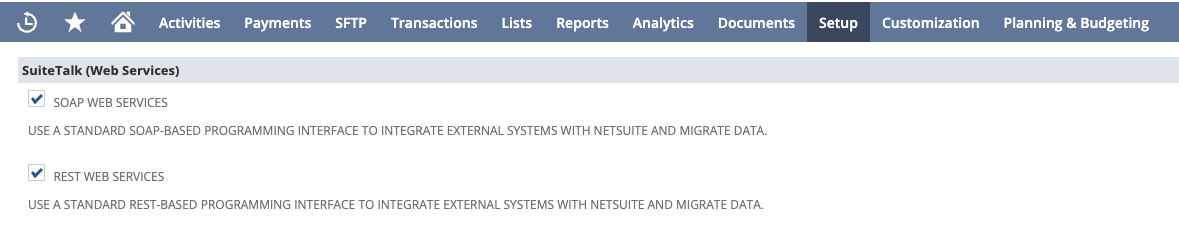
- Ensure you have admin privileges and login to your Netsuite account and navigate to Setup > Company > Enable Features
- Under the “SuiteTalk” header make sure the SOAP WEB SERVICES and REST WEB SERVICES checkboxes are checked
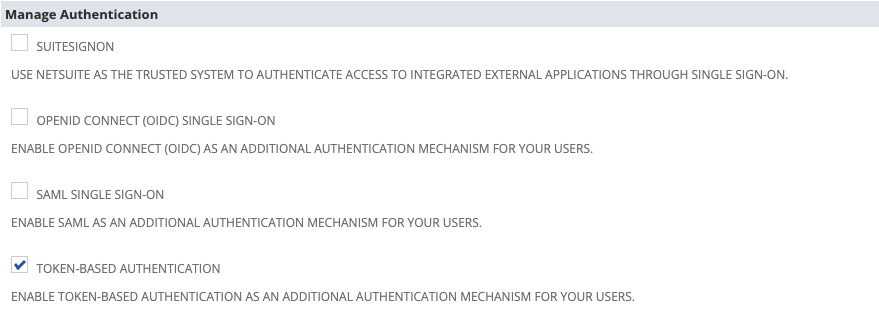
- Under the “Manage Authentication” header make sure the TOKEN-BASED AUTHENTICATION checkbox is checked
- Click the save button
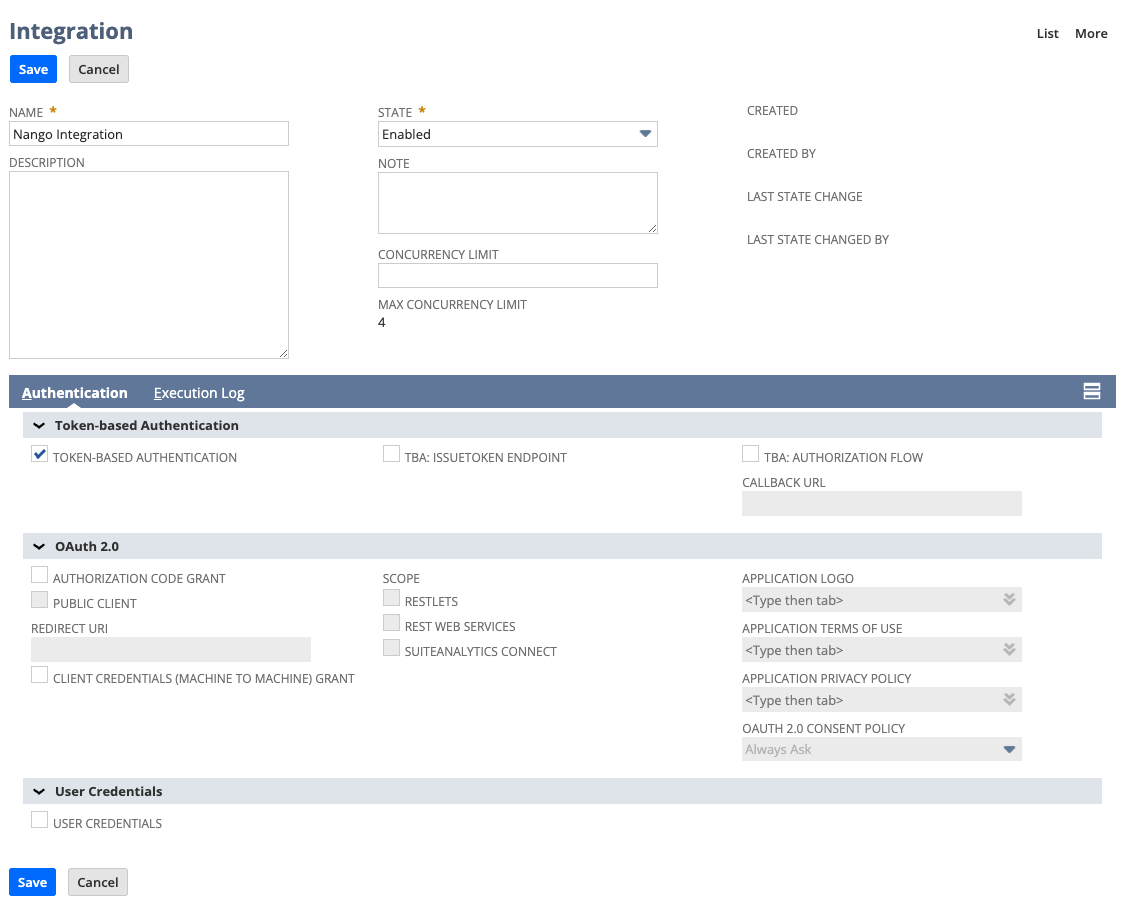
- Navigate to Setup > Integration > Manage Integrations > New
- Set the desired name of this integration
- Enable TOKEN-BASED AUTHENTICATION and disable TBA: AUTHORIZATION FLOW and AUTHORIZATION CODE GRANT
- Click the save button
- The client credentials will now be displayed and be sure to copy the Consumer Key, Client ID, Consumer Secret, and Client Secret
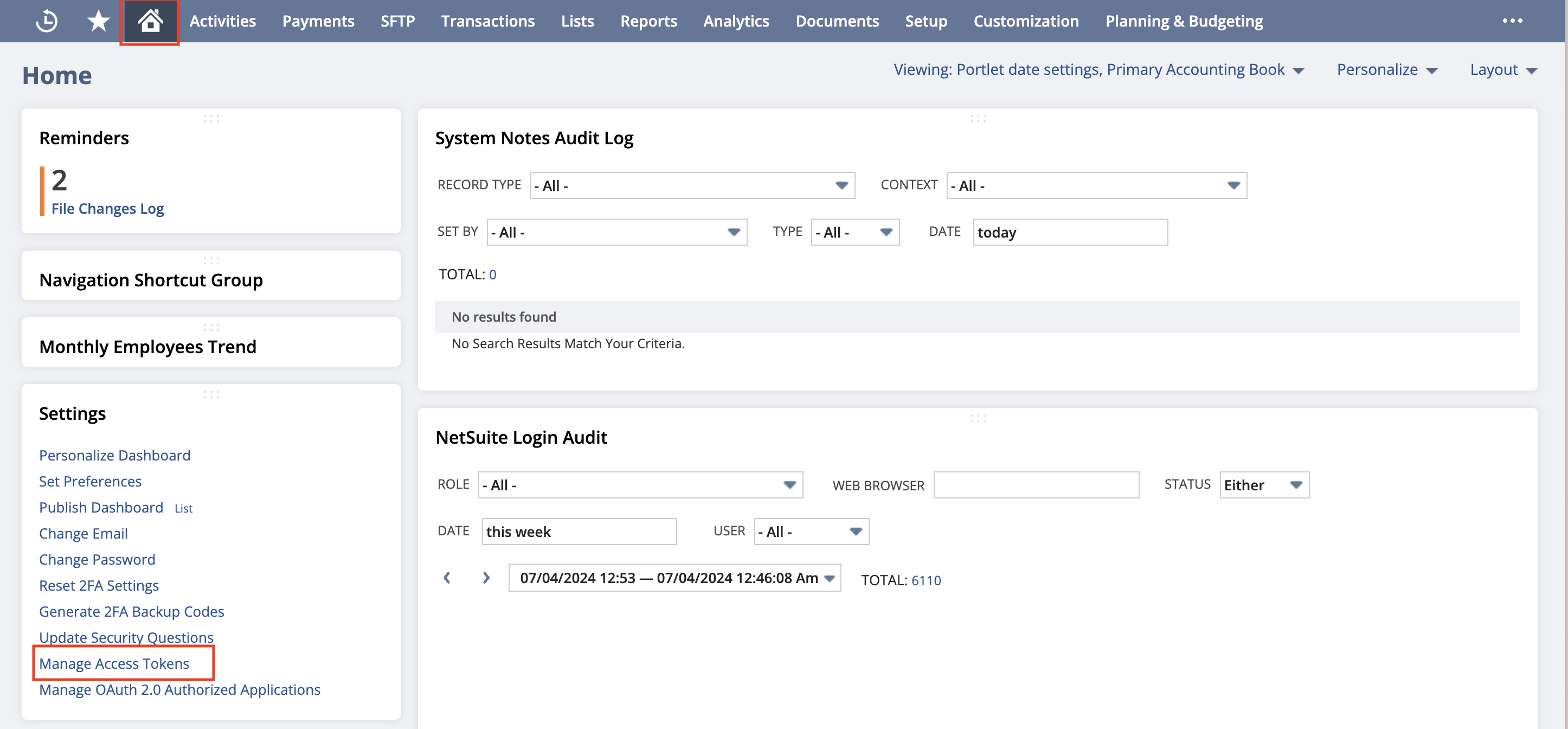
- Navigate to the homepage by clicking the home icon
- At the button left corner click the Manage Access Tokens button
- Select the Application Name you created for this integration
- Enter a “Token Name”
- Save your new access token
- The token credentials will now be displayed. Copy the “Token ID” & “Token Secret”
- In Nango create a new integration using the
netsuite-tbaand leave the “Client Id” and “Client Secret” values empty. - Create a new connection and for the “OAuth Client Id Override” value paste in the value you received from Netsuite called “Client ID” and for the “OAuth Client Secret” value paste in the value you received from Netsuite called “Client Secret”. For “Token ID” & “Token Secret” paste in the values you received from Netsuite from the access token step. The account ID value can be found from your Netsuite URL instance